Thursday, 11 October 2012

Operating on HBase columns


HBase is a column oriented database which stores its contents by column rather than by row. Instead of retrieving a record or row at a time, an entire column is retrieved and thus it becomes very powerful and efficient since data analytics is usually concerned with only one field or column of a record. The access becomes much faster, and much more relevant data can be extracted from the database in a shorter period of time.

As already mentioned in my previous post, apart from the basic read, write and delete operations I have developed another set of functions to perform union, intersection on hbase tables and also use having, between and distinct clauses as we do in SQL.
Since HBase is a column oriented database i.e. retrieves an entire column at a time instead of row it becomes very powerful and efficient since data analytics is usually concerned with only one field or column of a record. And for handling columns such functions play a significant role.

The sample program below illustrate the following operations :

Obtaining all distinct entries of a column from a table
Obtaining all distinct entries of a column from a table with the number of occurance of each.
Implemention of the Having operator.
Implementing the Having operator and extracting the entire satisfying rows
Implementation of the Between operator
Implementation of the Union operator
Implementation of the Intersection operator

Program :

import java.io.IOException;
import java.util.ArrayList;
import java.util.Arrays;
import java.util.HashMap;
import java.util.HashSet;
import java.util.Iterator;
import java.util.Set;
import org.apache.hadoop.fs.Path;
import org.apache.hadoop.hbase.HBaseConfiguration;
import org.apache.hadoop.hbase.client.Delete;
import org.apache.hadoop.hbase.client.Get;
import org.apache.hadoop.hbase.client.HTable;
import org.apache.hadoop.hbase.client.Put;
import org.apache.hadoop.hbase.client.Result;
import org.apache.hadoop.hbase.client.ResultScanner;
import org.apache.hadoop.hbase.client.Scan;
import org.apache.hadoop.hbase.filter.Filter;
import org.apache.hadoop.hbase.filter.FilterList;
import org.apache.hadoop.hbase.filter.SingleColumnValueFilter;
import org.apache.hadoop.hbase.filter.CompareFilter.CompareOp;
import org.apache.hadoop.hbase.filter.FilterList.Operator;
import org.apache.hadoop.hbase.util.Bytes;

public class HBaseTest
{
private static HBaseConfiguration conf;
HBaseTest()
    {
        conf = new HBaseConfiguration();
        conf.addResource(new Path("/path_to_your_hbase/hbase-0.20.6/conf/hbase-site.xml"));
    }

// function to obtain distinct col entries from a table.
   
public Set distinct(String tableName,String colFamilyName, String colName)
   {
    Set set = new HashSet();
    ResultScanner rs=null;
    Result res = null;
    String s = null;
    try
    {
        HTable table = new HTable(conf, tableName);
        Scan scan = new Scan();
        scan.addColumn(Bytes.toBytes(colFamilyName),Bytes.toBytes(colName));
        rs = table.getScanner(scan);
        while((res=rs.next()) != null)
        {
            byte [] obtCol = res.getValue(Bytes.toBytes(colFamilyName+":"+colName));               
            s = Bytes.toString(obtCol);
            set.add(s);
        }
    } catch (IOException e)
    {
        System.out.println("Exception occured in retrieving data");
    }
    finally
    {
        rs.close();
    }
    return set;
   }

// function to return distinct entries with the number of occurance of each.
   
public  HashMap distinctWithOccurances(String tableName,String colFamilyName, String  colName)
   {
    HashMap map = new HashMap();
    ResultScanner rs=null;
    Result res = null;
    try
    {
        HTable table = new HTable(conf, tableName);
        Scan scan = new Scan();
        rs = table.getScanner(scan);
        String s = null;
        while((res=rs.next()) != null)
        {
            int noofOccurance = 0;
            int count=0;
            byte [] obtCol = res.getValue(Bytes.toBytes(colFamilyName+":"+colName));               
            s = Bytes.toString(obtCol);
            Set set =  map.keySet();
            Iterator iterator = set.iterator();
            if(iterator != null)
            {
            while(iterator.hasNext() && count==0)
            {
                String colEntry = (String) iterator.next();
                if(colEntry.equals(s))
                {
                noofOccurance = map.get(colEntry);
                int newNoofOccurance = noofOccurance + 1;
                map.put(s,newNoofOccurance);
                count++;
                }
            }
            }
            if(count == 0)
            {
                map.put(s,1);
            }
        }
    } catch (IOException e)
    {
        System.out.println("Exception occured in retrieving data");
    }
    finally
    {
        rs.close();
    }
    return map;
   }

// function implementing having clause.
   
public ArrayList> having(String tableName,String colFamilyName, String [] colName,String havingColName,String value)
  {
    ResultScanner rs=null;
    ArrayList> al = new ArrayList>();
    Result res = null;
    try
    {
        HTable table = new HTable(conf, tableName);
        Scan scan = new Scan();
        SingleColumnValueFilter singleColumnValueFilterA = new SingleColumnValueFilter(
                Bytes.toBytes(colFamilyName), Bytes.toBytes(havingColName), CompareOp.EQUAL, Bytes.toBytes(value));
              singleColumnValueFilterA.setFilterIfMissing(true); 
                FilterList filter = new FilterList(Operator.MUST_PASS_ALL, Arrays
                           .asList((Filter) singleColumnValueFilterA));
                scan.setFilter(filter); 
        rs = table.getScanner(scan);
        while((res=rs.next()) != null)
        {
            HashMap map = new HashMap();
            String s = null;
            for(int j=0 ; j < colName.length ; j++)
            {
            byte[] obtainedRow = res.getValue(Bytes.toBytes(colFamilyName),Bytes.toBytes(colName[j]));
            System.out.println(colName[j]);
            s = Bytes.toString(obtainedRow);
            map.put(colName[j],s);
        }           
        al.add(map);
        }
    } catch (IOException e)
        {
            System.out.println("Exception occured in retrieving data");
        }
    finally
    {
        rs.close();
    }
        return al;
   }

// function implementing having clause and extracting the entire rows.
   
public ArrayList> havingWithEntireRow(String tableName,String colFamilyName[], String [][] colName,String havingColFamilyName,String havingColName,String value)
  {
    ResultScanner rs=null;
    ArrayList> al = new ArrayList>();
    Result res = null;
    try
    {
        HTable table = new HTable(conf, tableName);
        Scan scan = new Scan();
        SingleColumnValueFilter singleColumnValueFilterA = new SingleColumnValueFilter(
                    Bytes.toBytes(havingColFamilyName), Bytes.toBytes(havingColName), CompareOp.EQUAL, Bytes.toBytes(value));
            singleColumnValueFilterA.setFilterIfMissing(true); 
            FilterList filter = new FilterList(Operator.MUST_PASS_ALL, Arrays
                           .asList((Filter) singleColumnValueFilterA));
                scan.setFilter(filter); 
            rs = table.getScanner(scan);
        while((res=rs.next()) != null)
        {
            HashMap map = new HashMap();
            String s = null;
            for(int i=0 ; i< colFamilyName.length ; i++)
            {
            for(int j=0 ; j < colName[i].length ; j++)
            {
            byte[] obtainedRow = res.getValue(Bytes.toBytes(colFamilyName[i]),Bytes.toBytes(colName[i][j]));
            s = Bytes.toString(obtainedRow);
            map.put(colName[i][j],s);
            }   
            }
            al.add(map);
        }
    } catch (IOException e)
        {
            System.out.println("Exception occured in retrieving data");
        }
    finally
    {
        rs.close();
    }
        return al;
    }

// function implementing the between clause.
   
public ArrayList> between(String tableName,String colFamilyName, String [] colName,String betweenColName,String lowerValue,String upperValue)
   {
    ResultScanner rs=null;
    ArrayList> al = new ArrayList>();
    Result res = null;
    try
    {
        HTable table = new HTable(conf, tableName);
        Scan scan = new Scan();
        SingleColumnValueFilter singleColumnValueFilterA = new SingleColumnValueFilter(
                Bytes.toBytes(colFamilyName), Bytes.toBytes(betweenColName), CompareOp.GREATER, Bytes.toBytes(lowerValue));
                singleColumnValueFilterA.setFilterIfMissing(true); 
        SingleColumnValueFilter singleColumnValueFilterB = new SingleColumnValueFilter(
                     Bytes.toBytes(colFamilyName), Bytes.toBytes(betweenColName), CompareOp.LESS_OR_EQUAL, Bytes.toBytes(upperValue));
        singleColumnValueFilterB.setFilterIfMissing(true); 
        FilterList filter = new FilterList(Operator.MUST_PASS_ALL, Arrays.asList((Filter) singleColumnValueFilterA,
                                    singleColumnValueFilterB)); 
                scan.setFilter(filter); 
        rs = table.getScanner(scan);
        while((res=rs.next()) != null)
        {
            HashMap map = new HashMap();
            String s = null;
            for(int j=0 ; j < colName.length ; j++)
            {
            byte[] obtainedRow = res.getValue(Bytes.toBytes(colFamilyName),Bytes.toBytes(colName[j]));
            s = Bytes.toString(obtainedRow);
            map.put(colName[j],s);
            }           
            al.add(map);
        }
    } catch (IOException e)
        {
            System.out.println("Exception occured in retrieving data");
        }
    finally
    {
        rs.close();
    }
            return al;
   }

// function implementing union.

public ArrayList> union(String tableName,String colFamilyName1, String colFamilyName2,String [] colNames1,String [] colNames2, String colName1, String colName2,String value1,String value2)
   {
    ResultScanner rs=null;
    ArrayList> al = new ArrayList>();
    Result res = null;
    try
    {
        HTable table = new HTable(conf, tableName);
        Scan scan = new Scan();
        SingleColumnValueFilter singleColumnValueFilterA = new SingleColumnValueFilter(
                Bytes.toBytes(colFamilyName1), Bytes.toBytes(colName1), CompareOp.EQUAL, Bytes.toBytes(value1));
                singleColumnValueFilterA.setFilterIfMissing(true); 
                 
            SingleColumnValueFilter singleColumnValueFilterB = new SingleColumnValueFilter(
                     Bytes.toBytes(colFamilyName2), Bytes.toBytes(colName2), CompareOp.EQUAL, Bytes.toBytes(value2));
        singleColumnValueFilterB.setFilterIfMissing(true); 
                 
        FilterList filter = new FilterList(Operator.MUST_PASS_ONE, Arrays.asList((Filter) singleColumnValueFilterA,
                                    singleColumnValueFilterB)); 
                     
               scan.setFilter(filter); 
            rs = table.getScanner(scan);
        if(colFamilyName1.equals(colFamilyName2))
        {
        while((res=rs.next()) != null)
        {
            HashMap map = new HashMap();
            String s = null;
            for(int j=0 ; j < colNames1.length ; j++)
            {
            byte[] obtainedRow = res.getValue(Bytes.toBytes(colFamilyName1),Bytes.toBytes(colNames1[j]));
            System.out.println(colNames1[j]);
            s = Bytes.toString(obtainedRow);
            System.out.println(s);
            map.put(colNames1[j],s);
            }           
            al.add(map);
        }
        }
        else
        {
            while((res=rs.next()) != null)
            {
                HashMap map = new HashMap();
                String s = null;
                // extract row of the first col family
                for(int j=0 ; j < colNames1.length ; j++)
                {
                byte[] obtainedRow = res.getValue(Bytes.toBytes(colFamilyName1),Bytes.toBytes(colNames1[j]));
                s = Bytes.toString(obtainedRow);
                map.put(colNames1[j],s);
                }           
                // extract row of the second col family
                for(int k=0 ; k < colNames2.length ; k++)
                {
                byte[] obtainedRow = res.getValue(Bytes.toBytes(colFamilyName2),Bytes.toBytes(colNames2[k]));
                s = Bytes.toString(obtainedRow);
                map.put(colNames2[k],s);
                }       
                // put both in the arraylist
                al.add(map);
            }   
        }
    } catch (IOException e)
        {
            System.out.println("Exception occured in retrieving data");
        }
    finally
    {
        rs.close();
    }
    return al;
   }

// function implementing intersection.

public ArrayList> intersection(String tableName,String colFamilyName1, String colFamilyName2,String [] colNames1,String [] colNames2, String colName1, String colName2,String value1,String value2)
  {
    ResultScanner rs=null;
    ArrayList> al = new ArrayList>();
    Result res = null;
    try
    {
        HTable table = new HTable(conf, tableName);
        Scan scan = new Scan();
        SingleColumnValueFilter singleColumnValueFilterA = new SingleColumnValueFilter(
                    Bytes.toBytes(colFamilyName1), Bytes.toBytes(colName1), CompareOp.EQUAL, Bytes.toBytes(value1));
            singleColumnValueFilterA.setFilterIfMissing(true); 
        SingleColumnValueFilter singleColumnValueFilterB = new SingleColumnValueFilter(
                 Bytes.toBytes(colFamilyName2), Bytes.toBytes(colName2), CompareOp.EQUAL, Bytes.toBytes(value2));
                singleColumnValueFilterB.setFilterIfMissing(true); 
                 
        FilterList filter = new FilterList(Operator.MUST_PASS_ALL, Arrays.asList((Filter) singleColumnValueFilterA,
                                    singleColumnValueFilterB)); 
                scan.setFilter(filter); 
        rs = table.getScanner(scan);
        if(colFamilyName1.equals(colFamilyName2))
        {
        while((res=rs.next()) != null)
        {
            HashMap map = new HashMap();
            String s = null;
            for(int j=0 ; j < colNames1.length ; j++)
            {
            byte[] obtainedRow = res.getValue(Bytes.toBytes(colFamilyName1),Bytes.toBytes(colNames1[j]));
            s = Bytes.toString(obtainedRow);
            map.put(colNames1[j],s);
            }           
            al.add(map);
        }
        }
        else
        {
            while((res=rs.next()) != null)
            {
                HashMap map = new HashMap();
                String s = null;
                // extract row of the first col family
                for(int j=0 ; j < colNames1.length ; j++)
                {
                byte[] obtainedRow = res.getValue(Bytes.toBytes(colFamilyName1),Bytes.toBytes(colNames1[j]));
                s = Bytes.toString(obtainedRow);
                //System.out.println(s);
                map.put(colNames1[j],s);
                }           
                // extract row of the second col family
                for(int k=0 ; k < colNames2.length ; k++)
                {
                byte[] obtainedRow = res.getValue(Bytes.toBytes(colFamilyName2),Bytes.toBytes(colNames2[k]));
                s = Bytes.toString(obtainedRow);
                map.put(colNames2[k],s);
                }       
                // put both in the arraylist
                al.add(map);
            }   
        }
        } catch (IOException e)
        {
            System.out.println("Exception occured in retrieving data");
        }
        finally
        {   
            System.out.println("in intersection");
            rs.close();
        }
        return al;
   }

public static void main(String args[])
    {
        HBaseTest test  = new HBaseTest();
        String tableName = "testing_table" ;
        String [] colFamilyNames = {"colFamily1","colFamily2"};
        String [][] colNames  = {{"Id","Name"},{"Addr","Designation"}};

    Set set =  test.distinct(tableName,"colFamily1","Name");
    Iterator iterator = set.iterator();
    while(iterator.hasNext())
        {
            String valofKey = (String) iterator.next();
            System.out.println(valofKey + "=" + newMap.get(valofKey));
        }
          
       HashMap map = new HashMap();
       map = operationObj.distinctWithOccurances(tableName, "Name", "Designation");

       ArrayList> al_having = new ArrayList>();
       al_having = operationObj.havingWithEntireRow(tableName, colFamilyNames, colNames, "colFamily1", "Name", "Jayati");

       String [] reqdFieldNames1 = {"Id","Name"};
       String [] reqdFieldNames2 = {"Id","Name"};
       ArrayList> al_intersection = new ArrayList>();
       al_intersection = operationObj.intersection(tableName, colFamily1, colFamily2,reqdFieldNames1,reqdFieldNames2,"Id","Name","1","Jayati");
   
    // similarly union and between can be used
    }
}

Utilize HBase basic read-write functions


HBase is an open source, non-relational, distributed database providing BigTable like capabilities for Hadoop. Tables in HBase can be accessed using the Java-API for HBase but unfortunately a developer would require to put in a lot of efforts to do so. That is because the API provides a very restricted set of functions. For those new to API , it takes a lot of time to understand the available classes and use them to get the required job done.

So to enable easy handling of HBase tables, I have developed a wrapper library over the existing API which provides basic methods to create, read , delete records in hbase table and also another set of functions such as distinct, having, between, intersection, union which work for HBase just as we have these working in SQL. A big fraction of our work on tables depends on these functions and their availability makes using the HBase API easy.

This post includes a sample program to illustrate the usage of read and write functions only which specifically includes the following operations :

Adding entry to a single column
Adding records with a single column family and multiple columns
Adding a row with any number of column families and columns
Obtaining a single column entry
Obtaining the entire row
Reading all entries of a particular column of a table
Reading all records of an HBase Table
Deleting a record from an HBase Table

I have used hbase-0.20.6 and hadoop-0.20.1 and you could deploy this program on your eclipse and make test classes to check it.

Program :

import java.io.IOException;
import java.util.ArrayList;
import java.util.Arrays;
import java.util.HashMap;
import java.util.HashSet;
import java.util.Iterator;
import java.util.Set;
import org.apache.hadoop.fs.Path;
import org.apache.hadoop.hbase.HBaseConfiguration;
import org.apache.hadoop.hbase.client.Delete;
import org.apache.hadoop.hbase.client.Get;
import org.apache.hadoop.hbase.client.HTable;
import org.apache.hadoop.hbase.client.Put;
import org.apache.hadoop.hbase.client.Result;
import org.apache.hadoop.hbase.client.ResultScanner;
import org.apache.hadoop.hbase.client.Scan;
import org.apache.hadoop.hbase.filter.Filter;
import org.apache.hadoop.hbase.filter.FilterList;
import org.apache.hadoop.hbase.filter.SingleColumnValueFilter;
import org.apache.hadoop.hbase.filter.CompareFilter.CompareOp;
import org.apache.hadoop.hbase.filter.FilterList.Operator;
import org.apache.hadoop.hbase.util.Bytes;

public class HBaseTest
{
private static HBaseConfiguration conf;
HBaseTest()
    {
        conf = new HBaseConfiguration();
        conf.addResource(new Path("/path_to_your_hbase/hbase-0.20.6/conf/hbase-site.xml"));
    }

// assigns a value to a particular column of a record

public void addAColumnEntry(String tableName, String colFamilyName, String colName, String data)
    {
        try
        {
            HTable table = new HTable(conf, tableName);
            String row = "row" + Math.random();
            byte[] rowKey = Bytes.toBytes(row);
            Put putdata = new Put(rowKey);
            putdata.add(Bytes.toBytes(colFamilyName), Bytes.toBytes(colName),Bytes.toBytes(data));
            table.put(putdata);
        } catch (IOException e)
        {
            System.out.println("Exception occured in adding data");
        }
    }

// write a record to a table having just one column family or write only a portion of a record

public void addRecordWithSingleColumnFamily(String tableName, String colFamilyName, String [] colName,String [] data)
    {
        try
        {
            HTable table = new HTable(conf, tableName);
            String row = "row" + Math.random();
            byte[] rowKey = Bytes.toBytes(row);
            Put putdata = new Put(rowKey);
            if(colName.length == data.length)
            {
            for(int i=0 ; i < colName.length ; i++)
            putdata.add(Bytes.toBytes(colFamilyName), Bytes.toBytes(colName[i]),
                    Bytes.toBytes(data[i]));
            }
            table.put(putdata);
     
        } catch (IOException e)
        {
            System.out.println("Exception occured in adding data");
        }
    }

// add a record with any number of column families

public void addRecord(String tableName, String [] colFamilyName, String [][]  colName,String [][] data)
    {
        try
        {
            HTable table = new HTable(conf, tableName);
            String row = "row" + Math.random();
            byte[] rowKey = Bytes.toBytes(row);
            Put putdata = new Put(rowKey);
            for(int j=0 ; j < colFamilyName.length ; j++)
            {
            if(colName[j].length == data[j].length)
            {
            for(int i=0 ; i < colName[j].length ; i++)
            putdata.add(Bytes.toBytes(colFamilyName[j]), Bytes.toBytes(colName[j][i]),
                    Bytes.toBytes(data[j][i]));
            }
            }
            table.put(putdata);
     
        } catch (IOException e)
        {
            System.out.println("Exception occured in adding data");
        }
    }

// returns entry of a particular column of a record

public String getColEntry(String tableName, String rowName,String colFamilyName, String colName)
    {
        String result = null;
        try
        {
            HTable table = new HTable(conf, tableName);
            byte[] rowKey = Bytes.toBytes(rowName);
            Get getRowData = new Get(rowKey);
            Result res = table.get(getRowData);
            byte[] obtainedRow = res.getValue(Bytes.toBytes(colFamilyName),
                    Bytes.toBytes(colName));
            result = Bytes.toString(obtainedRow);
        } catch (IOException e)
        {
            System.out.println("Exception occured in retrieving data");
        }
        return result;
    }
 
// returns a row  in the form of a string.
 
public String getRow(String tableName, String rowName,String colFamilyName, String [] colName)
    {
            String result = colName[0];
        try
        {
            HTable table = new HTable(conf, tableName);
            byte[] rowKey = Bytes.toBytes(rowName);
            Get getRowData = new Get(rowKey);
            Result res = table.get(getRowData);
            for(int j=0 ; j < colName.length ; j++)
            {
            byte[] obtainedRow = res.getValue(Bytes.toBytes(colFamilyName),Bytes.toBytes(colName[j]));
            System.out.println(colName[j]);
            String s = Bytes.toString(obtainedRow);
            if(j==0)
                result = colName[j] + "=" + s ;
            else
                result = result + "&" + colName[j] + "=" + s;
            System.out.println(s);
            }
         
        } catch (IOException e)
        {
            System.out.println("Exception occured in retrieving data");
        }
        return result;
    }
 
// returns an arraylist of all entries of a column.
 
public ArrayList getCol(String tableName,String colFamilyName, String colName)
    {
        ArrayList al = new ArrayList();
        ResultScanner rs=null;
        Result res = null;
     
        try {
            HTable table = new HTable(conf, tableName);
         
            Scan scan = new Scan();
            scan.addColumn(Bytes.toBytes(colFamilyName),Bytes.toBytes(colName));
            rs = table.getScanner(scan);
            while((res=rs.next()) != null)
            {
                String colEntry = null;
                byte [] obtCol = res.getValue(Bytes.toBytes(colFamilyName+":"+colName));             
                colEntry = Bytes.toString(obtCol);
                al.add(colEntry);
            }
         
        } catch (IOException e)
        {
            System.out.println("Exception occured in retrieving data");
        }
        finally
        {
            rs.close();
        }
        return al;

    }
 
// returns a list of hashmaps, each hashmap containing entries of a single record.

public  ArrayList> getTable(String tableName,String [] colFamilyName, String [][] colName)
    {
    ResultScanner rs=null;
    ArrayList> al = new ArrayList>();
    Result res = null;
    try
    {
        HTable table = new HTable(conf, tableName);
        Scan scan = new Scan();
        rs = table.getScanner(scan);
        while((res=rs.next()) != null)
        {
            HashMap map = new HashMap();
            String s = null;
            for(int i=0 ; i             {
                for(int j=0 ; j < colName[i].length ; j++)
                    {
                        byte[] obtainedRow = res.getValue(Bytes.toBytes(colFamilyName[i]),Bytes.toBytes(colName[i][j]));
                        s = Bytes.toString(obtainedRow);
                        System.out.println(s);
                        map.put(colName[i][j],s);
                    }     
            }         
            al.add(map);
        }
    } catch (IOException e)
        {
            System.out.println("Exception occured in retrieving data");
        }
    finally
    {
        rs.close();
    }
        return al;
    }

// function to delete a row from the table.

public String deleteTableRow(String tableName, String rowName)
   {
   String result = null;
   try
   {
    HTable table = new HTable(conf, tableName);
    byte[] rowKey = Bytes.toBytes(rowName);
    Delete delRowData = new Delete(rowKey);
    table.delete(delRowData);
   } catch (IOException e)
    {
        System.out.println("Exception occured in retrieving data");
    }
  return result;

  }

public static void main(String args[])
    {
        HBaseTest test  = new HBaseTest();
        String tableName = "testing_table" ;
        String [] colFamilyNames = {"colFamily1","colFamily2"};
        String [][] colNames  = {{"Id","Name"},{"Addr","Designation"}};
         
        test.addAColumnEntry(tableName,"colFamily1","Name","Ram");
        test.addRecordWithSingleColumnFamily(tableName,"colFamily1",{"Id","Name"},{"117","Ram"});
        test.addRecord(tableName,colFamilyNames,colNames,{{"117","Ram"},{"ABC","Manager"}});

        // specify the rowKey as per your table

        test.getColEntry(tableName,rowKey,"colFamily1","Name");
        String yourRow = test.getRow(tableName,"row0.35234564623454","colFamily1",{"Id","Name"});

        ArrayList al = new ArrayList();
        al = test.getCol(tableName,"colFamily1","Name");

        ArrayList> listofmaps = new ArrayList>();
        listofmaps = test.getTable(tableName,colFamilyNames,colNames);

    // specify the rowKey as per your table

    test.deleteTableRow(tableName, rowKey);
    }
}

HBase coprocessors

Why HBase Coprocessors?

HBase has very effective MapReduce integration for distributed computation over data stored within its tables, but in many cases – for example simple additive or aggregating operations like summing, counting, and the like – pushing the computation up to the server where it can operate on the data directly without communication overheads can give a dramatic performance improvement over HBase’s already good scanning performance.
Also, before 0.92, it was not possible to extend HBase with custom functionality except by extending the base classes.

What are HBase Coprocessors?

In order to support sufficient flexibility for potential coprocessor behaviors, two different aspects of extension are provided by the framework. One is the observer, which are like triggers in conventional databases, and the other is the endpoint, dynamic RPC endpoints that resemble stored procedures.

What can HBase Coprocessors be used for?

exciting new features can be built on top of it, for example secondary indexing, complex filtering (push down predicates), and access control.
These are just a couple of interesting points from this excellent article. I strongly suggest reading it.

Wednesday, 3 October 2012

HAdoop on eclipse

Install Hadoop plug-in

The next step is to install and check the Hadoop plug-in for Eclipse.
  1. Download the eclipse for linux and perform                                                                                     tar -xvzf eclipse.tar.gz
  2. Copy the file "hadoop-0.19.1-eclipse-plugin.jar" from the Hadoop eclipse-plugin folder to the Eclipse plugins folder as shown in the figure below.
    Copy Hadoop Eclipse Plugin
  3. Close both windows
  4. Start Eclipse
  5. Configre jdk if it is not done by adding a line in eclipse.ini file -vm                                                                                                                                                path of jdk bin
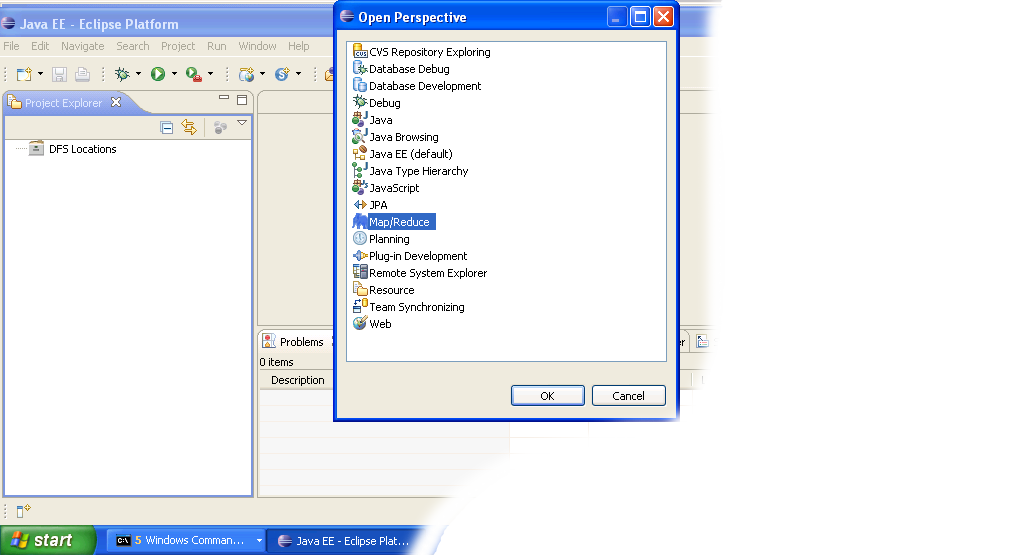
  6. Click on the open perspective icon ,which is usually located in the upper-right corner the eclipse application. Then select Other from the menu.
  7. Select Map/Reduce from the list of perspectives and press "OK" button.
  8. As a result your IDE should open a new perspective that looks similar to the image below.

    Eclipse Map/Reduce Perspective
Now that the we installed and configured hadoop cluster and eclipse plugin i's a time to test the setup by running a simple project.

Setup Hadoop Location in Eclipse

Next step is to configure Hadoop location in the Eclipse environment.
  1. Launch the Eclipse environment.
  2. Open Map/Reduce perspective by clicking on the open perspective icon (), select "Other" from the menu, and then select "Map/Reduce" from the list of perspectives.
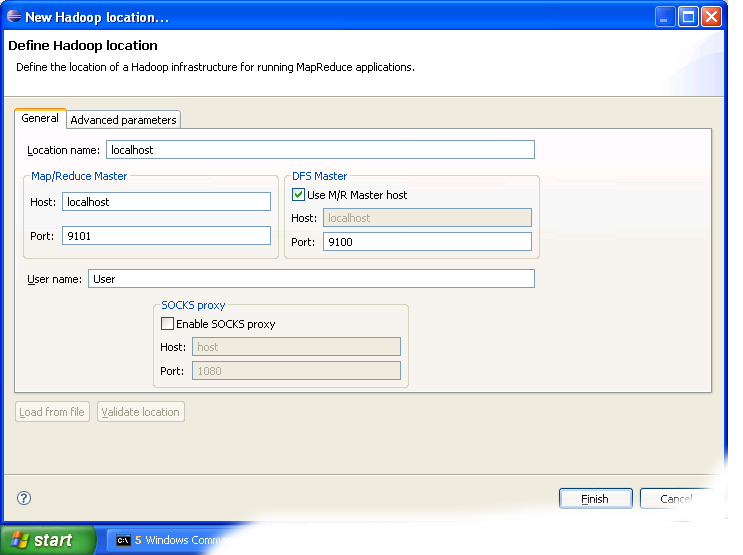
  3. After switching to the Map/Reduce perspective, select the Map/Reduce Locations tab located at the bottom of the Eclipse environment. Then right click on the blank space in that tab and select "New Hadoop location...." from the context menu. You should see a dialog box similar to the one shown below.

    Setting up new Map/Reduce location
  4. Fill in the following items, as shown on the figure above.
    • Location Name -- localhost
    • Map/Reduce Master
      • Host -- localhost
      • Port -- 9101
    • DFS Master
      • Check "Use M/R Master Host"
      • Port -- 9100
    • User name -- User
    Then press the Finish button.
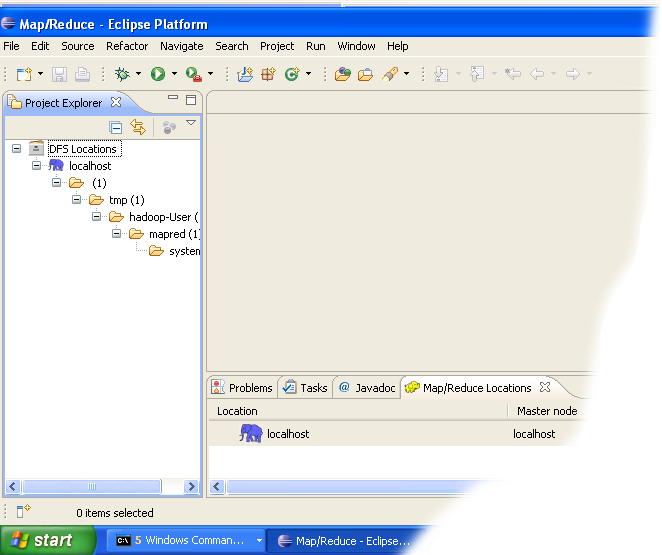
  5. After closing the Hadoop location settings dialog you should see a new location in the "Map/Reduce Locations" tab.
  6. In the Project Explorer tab on the left hand side of the Eclipse window, find the DFS Locations item. Open it using the "+" icon on its left. Inside, you should see the localhost location reference with the blue elephant icon. Keep opening the items below it until you see something like the image below.
  7. Browsing HDFS location
You can now move on to the next step.

Creating and configuring Hadoop eclipse project.

  1. Launch Eclipse.
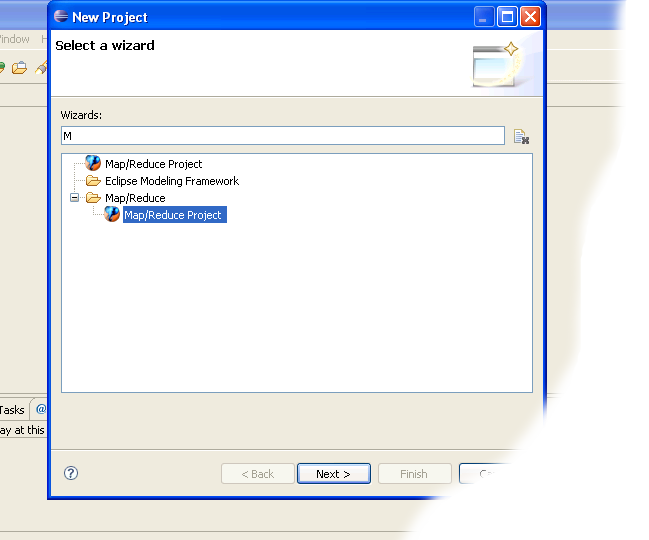
  2. Right-click on the blank space in the Project Explorer window and select New -> Project.. to create a new project.
  3. Select Map/Reduce Project from the list of project types as shown in the image below.

  4. Press the Next button.
  5. You will see the project properties window similar to the one shown below

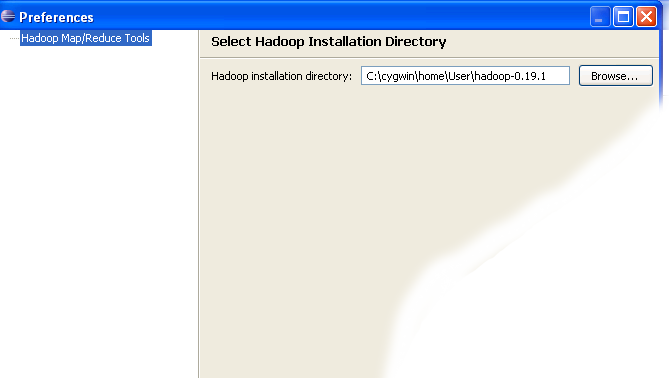
  6. Fill in the project name and click on Configure Hadoop Installation link on the right hand side of the project configuration window. This will bring up the project Preferences window shown in the image below.


  7. In the project Preferences window enter the location of the Hadoop directory in the Hadoop installation directory field as shown above.
    If you are not sure of the location of the Hadoop home directory, refer to Step 1 of this section. Hadoop home directory is one level up from the conf directory.

  8. After entering the location close the Preferences window by pressing the OK button. Then close the Project window with the Finish button.
  9. You have now created your first Hadoop Eclipse project. You should see its name in the Project Explorer tab.

Creating Map/Reduce driver class

  1. Right-click on the newly created Hadoop project in the Project Explorer tab and select New -> Other from the context menu.
  2. Go to the Map/Reduce folder, select MapReduceDriver, then press the Next button as shown in the image below.

  3. When the MapReduce Driver wizard appears, enter TestDriver in the Name field and press the Finish button. This will create the skeleton code for the MapReduce Driver.

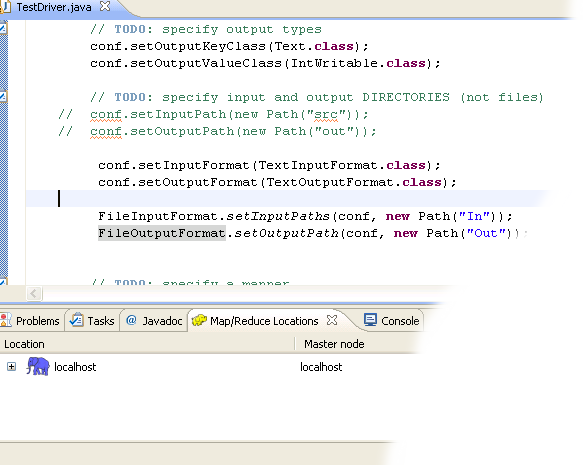
  4. Unfortunately the Hadoop plug-in for Eclipse is slightly out of step with the recent Hadoop API, so we need to edit the driver code a bit.

    Find the following two lines in the source code and comment them out:
    conf.setInputPath(new Path("src"));
    conf.setOutputPath(new Path("out"));
    Enter the following code immediatly after the two lines you just commented out (see image below):
    conf.setInputFormat(TextInputFormat.class);
    conf.setOutputFormat(TextOutputFormat.class);

    FileInputFormat.setInputPaths(conf, new Path("In"));
    FileOutputFormat.setOutputPath(conf, new Path("Out"));


  5. After you have changed the code, you will see the new lines marked as incorrect by Eclipse. Click on the error icon for each line and select Eclipse's suggestion to import the missing class.

    You need to import the following classes: TextInputFormat, TextOutputFormat, FileInputFormat, FileOutputFormat.
  6. After the missing classes are imported you are ready to run the project.

Running Hadoop Project


  1. Right-click on the TestDriver class in the Project Explorer tab and select Run As --> Run on Hadoop. This will bring up a window like the one shown below.

  2. In the window shown above select "Choose existing Hadoop location" , then select localhost from the list below. After that click Finish button to start your project.
  3. If you see console output similar to the one shown below, Congratulations! You have started the project successfully!

Sunday, 16 September 2012

hbase site


                hbase.rootdir

                hdfs://192.168.0.203:9102/hbase
                The directory shared by regon servers.                         Should be                         fully-qualified to include the filesystem to use.                         E.g:                         hdfs://NAMENODE_SERVER:PORT/HBASE_ROOTDIR                


                hbase.master
                192.168.0.203:60000
                By default ZK is configured with localhost which means                         the client                         should run on the same physical machine. Configure this if client runs on a                         different                         machine.        


                hbase.cluster.distributed
                true
                The mode the cluster will be in. Possible values are                         false: standalone and pseudo-distributed setups with managed                         Zookeeper                         true: fully-distributed with unmanaged Zookeeper Quorum (see                         hbase-env.sh)                


                hbase.zookeeper.quorum
                192.168.0.203
       
       
                hbase.zookeeper.property.clientPort
                2181


                hbase.tmp.dir
                /home/app/hbase-0.20.6/data/tmp
                Temporary directory on the local filesystem.                


                hbase.regionserver.class
                org.apache.hadoop.hbase.ipc.IndexedRegionInterface


                hbase.regionserver.impl
                org.apache.hadoop.hbase.regionserver.tableindexed.IndexedRegionServer                


Sample core-site.xml


    fs.default.name
    hdfs://namenode:8020


    fs.trash.interval
    2880
    true


    hadoop.tmp.dir
    /tmp/hadoop-${user.name}
    true


    webinterface.private.actions
    true
    Allows actions which should not be exposed to outside world eg killing jobs


    io.file.buffer.size
    65536


    io.compression.codecs
    org.apache.hadoop.io.compress.DefaultCodec,org.apache.hadoop.io.compress.GzipCodec,org.apache.hadoop.io.compress.BZip2Codec
    A list of the compression codec classes that can be used for compression/decompression.


    fs.checkpoint.dir
    /hadoop/name2/
    true
 

Sample Mapred-site.xml


    mapred.jobtracker.taskScheduler
    org.apache.hadoop.mapred.CapacityTaskScheduler


    mapred.queue.names
    hive,pig,default


    io.sort.record.percent
    0.70


    io.sort.spill.percent
    0.70


    io.sort.factor
    32


    io.sort.mb
    320


    mapred.child.java.opts
    -Xmx2048m


    mapred.child.ulimit
    7172096
    true


    mapred.job.tracker
    namenode_host_name:8021


    mapred.job.tracker.handler.count
    64
    true


    mapred.local.dir
    /hadoop1/mapred/,/hadoop2/mapred/,/hadoop3/mapred/,/hadoop4/mapred/,/hadoop5/mapred/,/hadoop6/mapred/
    true


    mapred.map.tasks.speculative.execution
    true


    mapred.reduce.parallel.copies
    20


    mapred.reduce.tasks
    54


    mapred.reduce.tasks.speculative.execution
    false


    mapred.tasktracker.map.tasks.maximum
    8
    true


    mapred.tasktracker.reduce.tasks.maximum
    4
    true


    tasktracker.http.threads
    40
    true


    mapred.output.compression.type
    BLOCK
    If the job outputs are to compressed as SequenceFiles, how should
    they be compressed? Should be one of NONE, RECORD or BLOCK.
    Cloudera's Distribution for Hadoop switches this default to BLOCK
    for better performance.


    mapred.compress.map.output
    true


    mapred.output.compression.codec
    org.apache.hadoop.io.compress.GzipCodec


    mapred.map.output.compression.codec
    org.apache.hadoop.io.compress.GzipCodec


    If users connect through a SOCKS proxy, we don't want their
    SocketFactory settings interfering with the socket factory associated
    with the actual daemons.

    hadoop.rpc.socket.factory.class.default
    org.apache.hadoop.net.StandardSocketFactory
    true


    hadoop.rpc.socket.factory.class.ClientProtocol
   
    true


    hadoop.rpc.socket.factory.class.JobSubmissionProtocol
   
    true


    mapred.job.reuse.jvm.num.tasks
    1


    mapred.capacity-scheduler.queue.default.capacity
    10
    Percentage of the number of slots in the cluster that are
    to be available for jobs in this queue.


    mapred.capacity-scheduler.queue.default.supports-priority
    true
    If true, priorities of jobs will be taken into
    account in scheduling decisions.


    mapred.capacity-scheduler.queue.default.minimum-user-limit-percent
    25
    Each queue enforces a limit on the percentage of resources
    allocated to a user at any given time, if there is competition for them.
    This user limit can vary between a minimum and maximum value. The former
    depends on the number of users who have submitted jobs, and the latter is
    set to this property value. For example, suppose the value of this
    property is 25. If two users have submitted jobs to a queue, no single
    user can use more than 50% of the queue resources. If a third user submits
    a job, no single user can use more than 33% of the queue resources. With 4
    or more users, no user can use more than 25% of the queue's resources. A
    value of 100 implies no user limits are imposed.


    mapred.capacity-scheduler.queue.default.maximum-initialized-jobs-per-user
    2
    The maximum number of jobs to be pre-initialized for a user
    of the job queue.


    mapred.capacity-scheduler.default-supports-priority
    true
    If true, priorities of jobs will be taken into
    account in scheduling decisions by default in a job queue.


    mapred.capacity-scheduler.default-minimum-user-limit-percent
    100
    The percentage of the resources limited to a particular user
    for the job queue at any given point of time by default.


    mapred.capacity-scheduler.default-maximum-initialized-jobs-per-user
    5
    The maximum number of jobs to be pre-initialized for a user
    of the job queue.


    mapred.capacity-scheduler.init-poll-interval
    5000
    The amount of time in miliseconds which is used to poll
    the job queues for jobs to initialize.


    mapred.capacity-scheduler.init-worker-threads
    5
    Number of worker threads which would be used by
    Initialization poller to initialize jobs in a set of queue.
    If number mentioned in property is equal to number of job queues
    then a single thread would initialize jobs in a queue. If lesser
    then a thread would get a set of queues assigned. If the number
    is greater then number of threads would be equal to number of
    job queues.


    mapred.capacity-scheduler.queue.hive.capacity
    70
    Percentage of the number of slots in the cluster that are
    to be available for jobs in this queue.


    mapred.capacity-scheduler.queue.default.supports-priority
    true
    If true, priorities of jobs will be taken into
    account in scheduling decisions.


    mapred.capacity-scheduler.queue.default.minimum-user-limit-percent
    100
    Each queue enforces a limit on the percentage of resources
    allocated to a user at any given time, if there is competition for them.
    This user limit can vary between a minimum and maximum value. The former
    depends on the number of users who have submitted jobs, and the latter is
    set to this property value. For example, suppose the value of this
    property is 25. If two users have submitted jobs to a queue, no single
    user can use more than 50% of the queue resources. If a third user submits
    a job, no single user can use more than 33% of the queue resources. With 4
    or more users, no user can use more than 25% of the queue's resources. A
    value of 100 implies no user limits are imposed.


    mapred.capacity-scheduler.queue.default.maximum-initialized-jobs-per-user
    10
    The maximum number of jobs to be pre-initialized for a user
    of the job queue.


    mapred.capacity-scheduler.queue.pig.capacity
    20
    Percentage of the number of slots in the cluster that are
    to be available for jobs in this queue.


    mapred.capacity-scheduler.queue.default.supports-priority
    true
    If true, priorities of jobs will be taken into
    account in scheduling decisions.


    mapred.capacity-scheduler.queue.default.minimum-user-limit-percent
    50
    Each queue enforces a limit on the percentage of resources
    allocated to a user at any given time, if there is competition for them.
    This user limit can vary between a minimum and maximum value. The former
    depends on the number of users who have submitted jobs, and the latter is
    set to this property value. For example, suppose the value of this
    property is 25. If two users have submitted jobs to a queue, no single
    user can use more than 50% of the queue resources. If a third user submits
    a job, no single user can use more than 33% of the queue resources. With 4
    or more users, no user can use more than 25% of the queue's resources. A
    value of 100 implies no user limits are imposed.


    mapred.capacity-scheduler.queue.default.maximum-initialized-jobs-per-user
    5
    The maximum number of jobs to be pre-initialized for a user
    of the job queue.